GitHub Copilot App is now in Technical Preview
Today GitHub released the GitHub Copilot App into technical preview. I’ve been using it as my daily driver for a while now, so I started a video series to share what I’ve learned. This post covers the intro to the app and a first look at using it for repository maintenance.
The app is a standalone desktop experience — available on Windows, macOS, and Linux — built specifically for agent-driven development. The big idea is that all the context you’re working with already lives in GitHub, so the app starts there. Instead of context-switching between your terminal, IDE, and browser, you do all of that in one place.
A few things that stand out from the changelog announcement:
- Parallel sessions — each session gets its own git work tree, branch, and task state, so you can run multiple agents against the same repo without them stepping on each other
- Three session modes: Interactive (you collaborate step by step), Plan (agent proposes, you approve), or Autopilot (fully autonomous)
- A GitHub inbox showing open issues and PRs across connected repos, so you can start a session directly from real work that’s waiting
- Agent Merge — the agent watches CI checks, downloads failure logs, resolves merge conflicts, and pushes fixes automatically before merging (more on this below)
- Model choice per session, including reasoning effort tuning
Out of this, Agent Merge is my favorite feature! It will fix merge conflicts, CI failures, Security Alerts, and other common issues that pop up during the PR lifecycle, without you having to lift a finger. Saves a lot of manual work and context switching, and it just works. I have a video below where I show it in action.
To get access right now:
- Copilot Pro and Pro+: join the waitlist
- Copilot Business and Enterprise: available this week once your org admin has enabled preview features and the Copilot CLI in policy settings
First look: introducing the app
In the first video I walk through what the app actually looks like and how a typical session flows — picking an issue from the inbox, watching the agent plan and implement it, then Agent Merge handling the PR without any babysitting from me.
The app uses git work trees under the hood. Each session lives in its own work tree, so three concurrent sessions against the same repo just work — no branch conflicts, no waiting.
The commit signing moment in the video is a real one: the agent ran into the GPG passphrase prompt, flagged it, and waited for me to type it in before continuing. Small thing, but it shows that the interactive mode is genuinely interactive rather than just autopilot with a pause button.
Using it for repo maintenance
Once you get past the intro, the maintenance use case is where this really starts to pay off. In the second video I take a repo with a backlog of open issues and a pile of Dependabot PRs, and use the app to triage and action them without writing a single line of code myself.
Starting from a natural language prompt like “triage open PRs and issues from a maintainer perspective” kicks off the repo status agent, which pulls in Dependabot vulnerability alerts alongside the regular issues and PRs. It then surfaces what’s safe to merge, what needs a look, and what’s been sitting untouched. From there you can tell it to kick off sub-agents for each issue in parallel — separate work trees, separate PRs, all running concurrently while you go deal with something else.
A tip that’s easy to miss: Ctrl+K / Cmd+K opens a command palette that lets you search all your recent sessions, jump to specific ones, and see their current status. Handy once you have more than a handful of sessions in flight.
To give a sense of boosts this app can give an engineer: you can find my contributions on a page (created with the GitHub Copilot App ofc): devex-metrics.github.io/devex-metrics where you can find 368 PR’s MERGED in the last 30 days. Just on OSS contributions (mostly my own projects).
In the image below you can find an overview of 2 days of sessions I have worked on with the App (and yes, I still work in the CLI and VS Code as well, although way less, might be only 5% outside of the App).
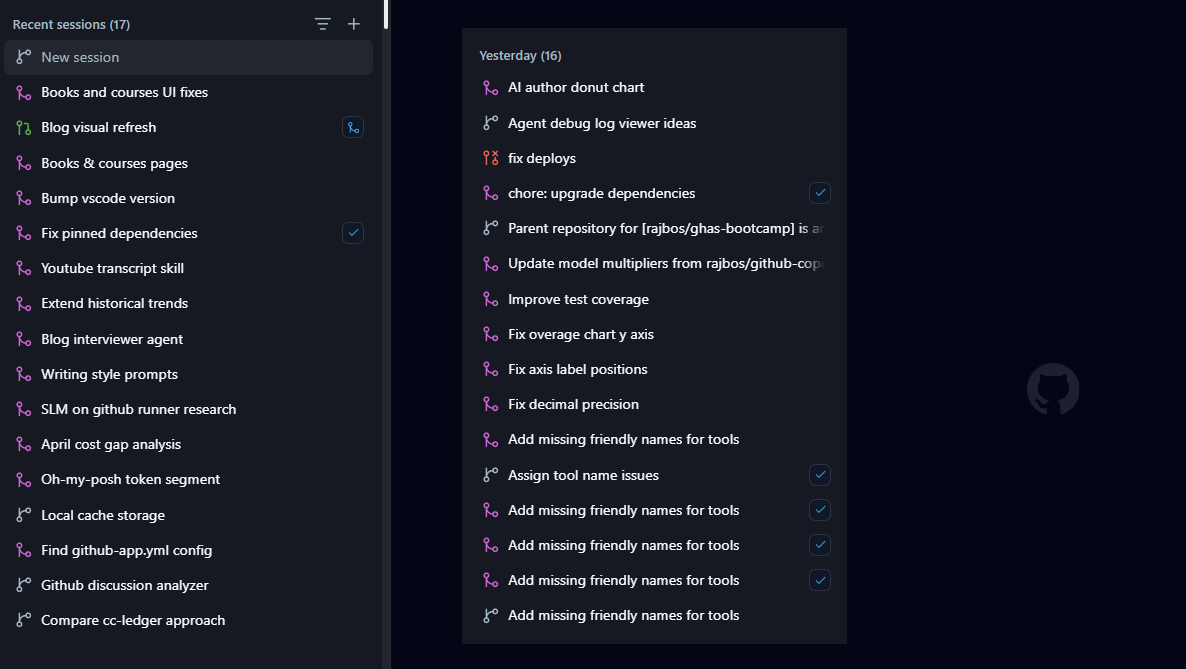
Amazing to see what a person can do and achieve these days!
I’ll keep adding videos to the series as I go deeper. Drop a comment on either video if there’s something specific you want me to cover or ping me on LinkedIn