Running MCP servers securely
MCP (Model Context Protocol) servers give AI assistants like GitHub Copilot access to external tools and data: querying databases, calling APIs, reading repositories, and triggering pipelines. Getting those servers running reliably and securely for a whole development team gets complicated fast. There has been a lot of development in this space over the last year.
There are several issues at play when you want to work with MCP Servers:
- Security concerns with executing them and the access they have
- Discovery and governance of which MCP servers are approved for use
I’ve been researching hosting options for MCP servers. This is the state of that research so far: how can we host them effectively while reducing security risks and giving teams clear governance?
Security concerns
MCP servers are powerful but potentially risky. They often need access to sensitive data, credentials, or internal systems. If a server is compromised, it could be a major attack vector. Running MCP servers locally on each developer’s machine means they inherit all the security context of that machine — which is a big risk. That includes 3rd party libraries directly installed on the developer’s OS. Running these MCP servers in a containerized environment with strict access controls could significantly reduce the attack surface, but a lot of MCP servers are not configured that way and run locally through npx (npm executable), uvx (PyPi executable), Docker or similar tools.
Research from EndorLabs about the State of Dependency Management 2025 focused on MCP servers and their lineage, showing that a massive amount of MCP servers have not been maintained at all since their creation, and often lack support from a community of maintainers driving it forward. This means that many MCP servers are not receiving regular security updates, making them potentially vulnerable to exploits. When developers run these MCP servers locally, they are exposed to these vulnerabilities, which could lead to security breaches if the MCP server is compromised.
Since MCP servers are a very effective man in the middle in your AI workflow, they can be used to exfiltrate data, access internal systems, or perform malicious actions if compromised. An MCP server can expose prompts, agent definitions, and tools. All these places allow for manipulation of both data and your prompts (prompt injection attacks). if an attacker can compromise an MCP server, they could potentially manipulate the prompts being sent to the AI model, leading to unintended actions or leak data to a 3rd party system. This is especially concerning if the MCP server has access to sensitive data or internal systems (which is a high level of probability on an engineers development environment these days).
Running local server concerns
Running MCP servers locally on developers’ machines is the most common setup. Unfortunately, most MCP clients, such as code editors, host a server only for themselves. If I hop between editors, each editor starts its own process for the MCP servers I use. I expect MCP tools to become common enough that a centrally governed local service will make sense, with an allowlist that controls which client can use each server.
Let’s take an example with an engineer that runs both VS Code and IntelliJ. They switch between those editors when they work on different parts of their normal work, for example backend work in Java in IntelliJ and front end work in Typescript in VS Code. Next to that they have a todo application where they plan their work. If they manage their work for a part in something like Jira (user stories and tasks), Azure Boards (work items), or GitHub Issues, they might need to plan things across all those environments. If they want to use an MCP server that can read and write to their issue tracker, they would need to run a separate instance of that MCP server for each editor, and then keep those in sync with each other. Each instance also would have to be set up with the correct credentials.
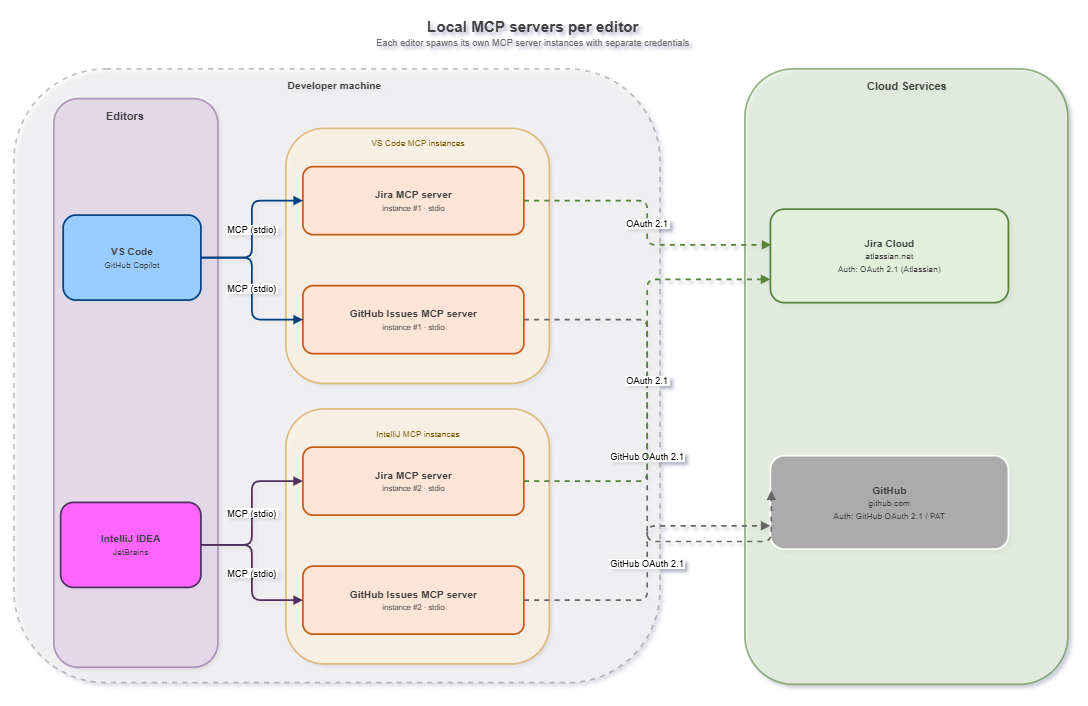
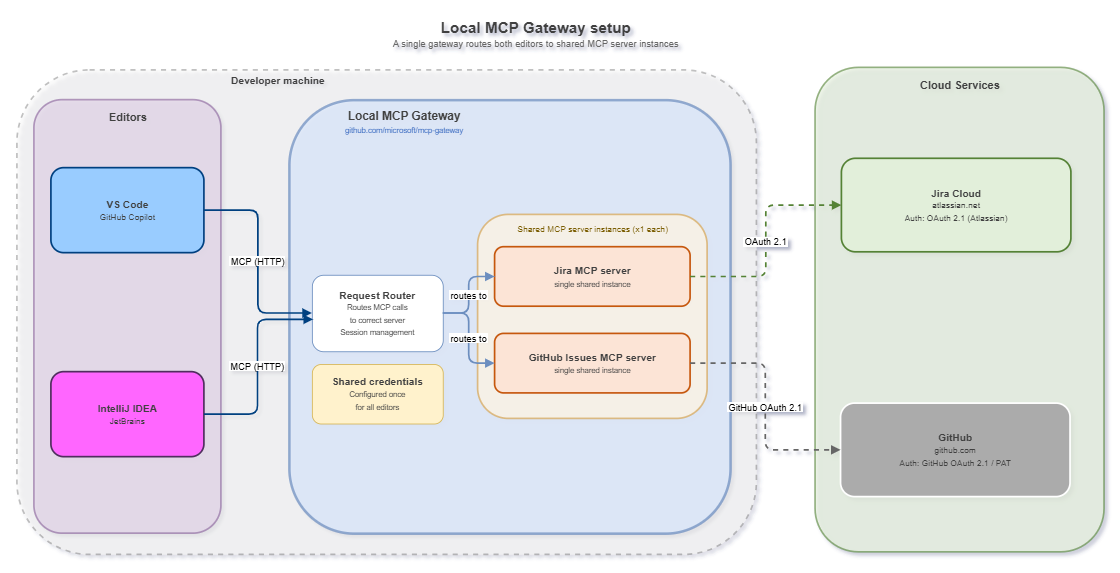
That is where a local MCP Gateway comes into play. I can host microsoft/mcp-gateway locally and configure it in each editor. The MCP server runs once; the gateway routes requests from each editor to that instance. It also centralizes server configuration and authentication for external services.
The resulting local setup:
Discovery and governance concerns
Next to the runtime security concerns (dependencies, hosting multiple instances, and even local installation issues if the ecosystem is not installed), there is also a discovery and governance problem: how do developers know which MCP servers they can use in your organization? How do you ensure they only use approved servers that meet your security standards? A central registry of approved MCP servers, integrated with developer tools, can help solve this.
This part can be covered by hosting your own MCP Registry: a catalog of approved MCP servers that developers can discover and connect to. Azure API Center provides this capability with an enterprise-grade MCP server registry integrated with VS Code and GitHub Copilot, or you can build and host your own, with an example available here github.com/rajbos/mcp-registry-demo.
After setting up a registry, Enterprise-ready tools such as VS Code can allow connections only to registered servers. With GitHub Enterprise, GitHub Copilot can enforce an allowlist through a private registry: the MCP registry access policy can be set to “Allow all” or “Registry only”. The policy is configured at the Enterprise or organization that grants the licence, and it applies only to supporting clients.
Note that GitHub marks this registry policy as public preview and does not call it the recommended method. For stricter control GitHub points to the enterprise MCP allowlist in managed-settings.json, which is generally available. That allowlist matches remote servers by URL (serverUrl) and local servers by their exact command and arguments (serverCommand), and is deployed to the developer machines with device management.
Local and remote servers in the registry
“Registry only” is not limited to remote servers. Local (stdio) servers that run on the developer machine through npx, uvx, or Docker are enforced as well: they need to be in the registry, or the client blocks them. You can see the difference in the registry data. A remote server has a remotes entry with the URL the client connects to:
"remotes": [
  { "type": "streamable-http", "url": "https://learn.microsoft.com/api/mcp" }
]
A local server has a packages entry that tells the client what to download and run, where the registryType indicates how: npm (npx), pypi (uvx), or oci (a container image run with Docker):
"packages": [
  {
    "registryType": "oci",
    "identifier": "docker.io/sonarsource/sonarqube-mcp",
    "transport": { "type": "stdio" }
  }
]
The servers.json in my demo registry has examples of both, including the Docker-based SonarQube MCP server, and the CONTRIBUTING guide shows the matching client configuration.
Registry validation happens on the developer device
I found an important detail while configuring a server from a private MCP registry. The name, type, and URL in the local MCP configuration must exactly match the registered server, or the client will not start it. For local servers, the name in your mcp.json has to match the server name in the registry, so a server configured as sonarqube is blocked when the registry has it as io.github.SonarSource/sonarqube-mcp-server. Installing the server from the registry (for example through the MCP gallery in VS Code) sets the matching name for you. That protects developers from accidentally selecting a different server, but the validation happens locally.
Someone who can alter local configuration can provide the expected registry values and redirect the endpoint through a local override to a different cloud service. GitHub confirms this in the MCP private registry enforcement reference: enforcement is based only on server name/ID matching, and can be bypassed by editing configuration files. A private registry should therefore be one layer of the control, not the only one. Endpoint protection needs to detect unexpected process and network activity, and anomaly detection should flag MCP traffic going to endpoints that are not part of the approved setup.
According to that same reference, the registry policy is enforced in these clients:
- GitHub Copilot in VS Code (v1.109.3 and up)
- GitHub Copilot in Visual Studio (v18.4.0 and up)
- GitHub Copilot in JetBrains IDEs (v1.5.64 and up)
- GitHub Copilot in Eclipse (v4.38 and up)
- GitHub Copilot in Xcode (v0.47.0 and up)
- GitHub Copilot CLI (v1.0.11 and up)
And is not supported in:
- GitHub Copilot cloud agent
Clients that are not in that list, such as GitHub Copilot in Neovim, GitHub Copilot Spaces, and the GitHub Copilot Review Agent, are not covered as far as I can tell. The same goes for other editors that do not support GitHub Copilot.
Potential solutions for centralizing an MCP Gateway and Private Registry
I am researching two approaches:
- Using Azure API Management as a secure gateway in front of MCP servers, augmented with Azure API Center as a private registry
- Using the MCP Gateway to host your MCP servers in a secure, containerized environment for the entire organization (instead of each developer running their own instance on their machine), moved behind the Azure API Management gateway for the security layer, also linking it up to Azure API Center as a private registry
The TL;DR of things I am running into is that Azure API Management provides a powerful perimeter security layer with Entra ID authentication, rate limiting, and monitoring, but lacks session-aware routing and adapter lifecycle management.
MCP Gateway provides session-aware routing and adapter management but does not natively support per-user OAuth for remote servers. The two products cover different parts of the problem.
So in short:
- APIM can help with remote MCP servers, but lacks user specific OAuth support
- MCP Gateway can help with local stdio MCP servers, but lacks per-user OAuth support for remote servers. Can sit behind APIM for security and having everything in one place.
The MCP Gateway can run in a k8s setup and can be exposed through APIM, so that is a nice way to tackle problems at the same time, at least for remote/local servers that do not require per-user OAuth.
So lets see how far we can get combining these two solutions, and where the gaps are that we need to fill with custom code or configuration.
The central MCP Gateway approach
One option is to use the same microsoft/mcp-gateway repo in a centrally hosted service. This solves a real pain point: instead of every developer installing and running MCP servers locally on their own machine, or hosting a gateway on their own machine, the gateway hosts them inside Docker containers in a Kubernetes cluster.
Developers connect to a central endpoint and get all the MCP tools they need — no Node.js, no Python runtimes, no npx invocations cluttering their laptops, saving the bandwidth, security issues of the different package managers, and centralize the maintenance cycles of keeping these servers up to date.
This also improves security. A locally running MCP server inherits the developer’s filesystem access, credentials, and OS context. A containerized server in a cluster has only the access I explicitly give it. That reduces the blast radius if a server is compromised or behaves unexpectedly.
The MCP Gateway repo lets you configure the gateway with a couple of services:
- MCP Server gateway: register and retrieve listed MCP servers
- tool gateway: a tool gateway that routes tool calls to the correct backend MCP server in a container
- Redis: for session state management and routing And then per server that you register with the gateway, a container will be spun up with the MCP server running inside, and the gateway will route requests to the correct container based on the session ID.
Where the MCP Gateway falls short
The MCP Gateway works well for stdio-based MCP servers running with shared credentials as the API keys can only be injected at deployment time. This is also the fundamental limitation with all other authentication options. There is no concept of per-user session state or per-user OAuth tokens. The gateway cannot inject a different GitHub personal access token for each developer who connects.
So this does not work for these two use cases:
- Remote, OAuth-authenticated MCP servers: each MCP server runs as a single shared instance.
- Local MCP servers that require per-user auth: this gateway cannot inject different credentials for each user session.
This blocks setting up this flow for MCP servers like:
- GitHub MCP server (
api.githubcopilot.com/mcp/), which uses GitHub OAuth or a Personal Access Token (which should not be used anyway if possible) - Context7 MCP server, which needs an Personal Access Token for each user to connect to the Context7 service
The Azure API Management (APIM) approach
Azure API Management is a managed API gateway with first-class Entra ID support. It can restrict an MCP endpoint to authenticated people in my organization. APIM policies can validate incoming tokens, enforce rate limits, and send telemetry to Application Insights. An MCP server that exposes tools or resources over a normal REST API can sit behind APIM, which handles Entra ID authentication before forwarding the request.
APIM currently cannot expose MCP prompts. I could not verify why, so that needs more research. It may not be a significant issue while prompts are also available from sources such as Awesome Copilot.
Options to run MCP servers in Azure API Management
There are four primary Azure native hosting options for running MCP servers:
- Azure API Management (direct REST to MCP server)
- Azure Container Apps (to use the container runtime)
- Azure App Service (REST based MCP servers)
- Azure Functions (REST based MCP servers)
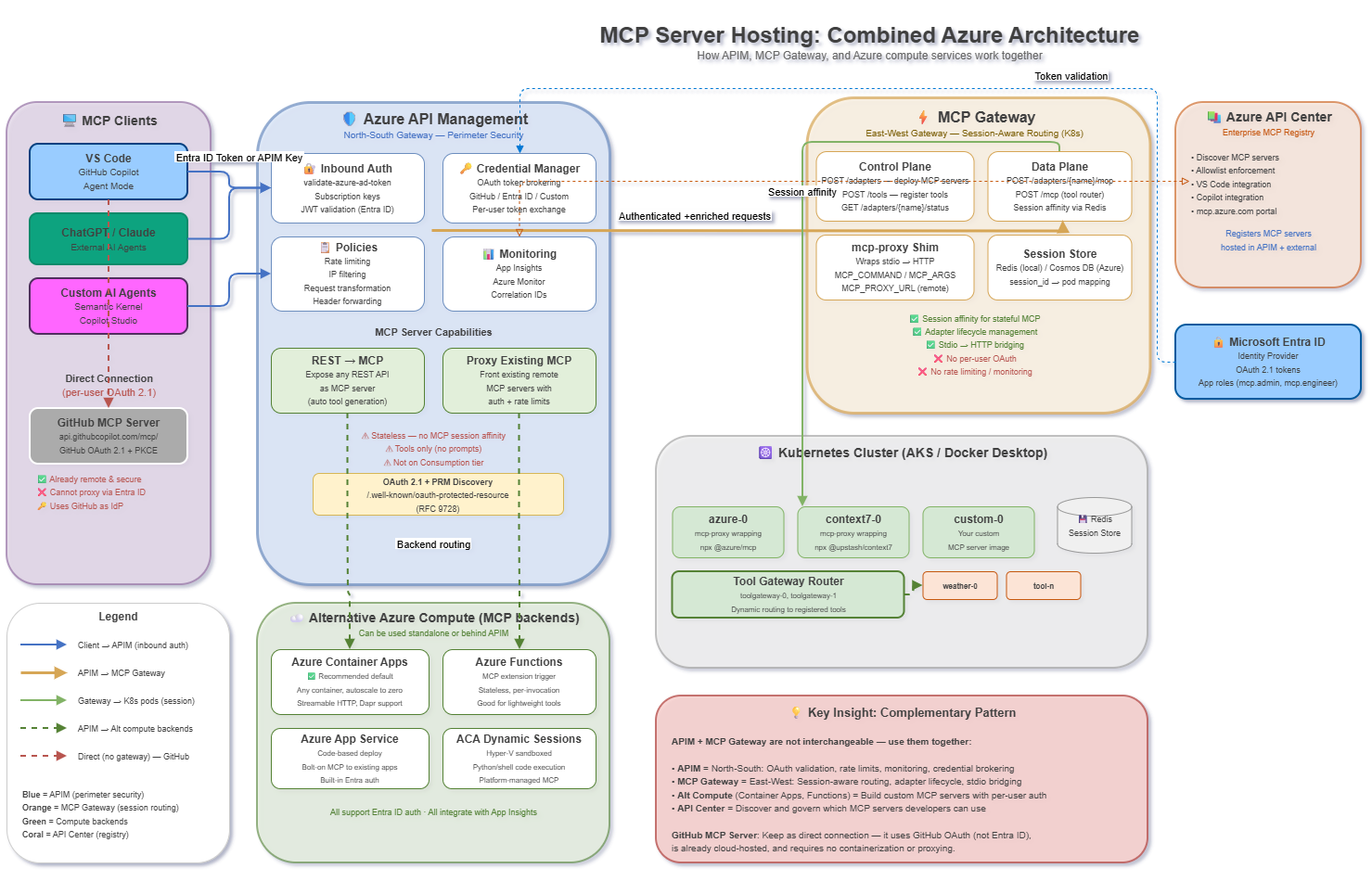
And additionally you can also use the MCP Gateway as another backend and expose those MCP servers with shared state through APIM as well, so that you have one shared front end. APIM and MCP Gateway are complementary, not interchangeable: APIM handles north-south concerns (OAuth, rate limiting, monitoring) while MCP Gateway handles east-west session-aware routing. The user’s core concern—that MCP Gateway doesn’t support per-user OAuth for remote servers like the GitHub MCP server—is valid. APIM can help by fronting MCP servers with Entra ID auth.
Known limitations
APIM does have a couple of limitations to be aware of when hosting MCP servers. None of them really block the core use case of hosting remote MCP servers with Entra ID auth, but they are good to be aware of when designing your architecture:
- APIM is stateless: It does not maintain MCP session affinity. Each HTTP call flows independently
- No session-aware routing: Cannot pin
Mcp-Session-Idto a specific backend pod (unlike MCP Gateway) - MCP tools only: Currently supports MCP tools, not MCP resources or prompts
- Not available on Consumption tier
- Response body access prohibited: Don’t use
context.Response.Bodyin MCP server policies—it breaks streaming - Workspace support: MCP server capabilities not yet supported in APIM workspaces
APIM Pricing Consideration
Something to keep in mind is that APIM is billed per instance/tier, not per request. The Developer tier is cheapest (~$50/month) but has no SLA. Standard v2 starts around $170/month. This is significantly more expensive than just running MCP Gateway on an existing AKS cluster. If you already have an APIM instance running, then it does make sense to add this capability to it, as it is available out of the box. The value add of APIM is the security/routing/monitoring/rate-limiting features, so if you need those, it can be worth the cost. If you just want to host some MCP servers without those features, it might be overkill.
Also note that the MCP server features are not available in the Consumption tier, so you need at least the Developer tier to use APIM for MCP servers.
What I could not verify yet: Oauth
- Whether APIM Credential Manager supports the OAuth passthrough required by e.g. the GitHub MCP server (the GitHub MCP server uses specific MCP-related scopes that may not align with standard GitHub OAuth App scopes)
- Performance characteristics of APIM fronting MCP streaming endpoints at scale
So the main questions that remain:
- How to centralize access to remote servers like the GitHub MCP server that require per-user OAuth.
- How to centralize access/hosting to local servers like the GitHub MCP server that require per-user OAuth.
Architectural overview of Clients/APIM + MCP Gateway
Key References used in this research
Of course I used AI to help me with this research, so I also looked for a lot of resources to understand the different options and their limitations. Here are some of the key references I used in this research:
Official Microsoft Documentation
| Resource | URL |
|---|---|
| APIM MCP Server Overview | https://learn.microsoft.com/en-us/azure/api-management/mcp-server-overview |
| Expose Existing MCP Server | https://learn.microsoft.com/en-us/azure/api-management/expose-existing-mcp-server |
| Expose REST API as MCP Server | https://learn.microsoft.com/en-us/azure/api-management/export-rest-mcp-server |
| Secure MCP Servers | https://learn.microsoft.com/en-us/azure/api-management/secure-mcp-servers |
| Choose Azure Service for MCP | https://learn.microsoft.com/en-us/azure/container-apps/mcp-choosing-azure-service |
| Azure Functions MCP Tutorial | https://learn.microsoft.com/en-us/azure/azure-functions/functions-mcp-tutorial |
| APIM Credential Manager (GitHub) | https://learn.microsoft.com/en-us/azure/api-management/credentials-how-to-github |
| Azure API Center MCP Registry | https://learn.microsoft.com/en-us/azure/api-center/register-discover-mcp-server |
GitHub Samples
| Repository | Description |
|---|---|
| blackchoey/remote-mcp-apim-oauth-prm | MCP Server with PRM + APIM + Entra ID |
| Azure-Samples/remote-mcp-apim-functions-python | Secure remote MCP via APIM + Azure Functions |
| Azure-Samples/mcp-auth-servers | MCP auth reference collection |
| Azure-Samples/AI-Gateway (MCP labs) | MCP client authorization lab |
| localden/remote-auth-mcp-apim-py | Entra ID-protected MCP server with APIM |
| microsoft/mcp-gateway | This repo - session-aware MCP reverse proxy |
Blog Posts and Articles
| Article | URL |
|---|---|
| Secure Remote MCP Servers with Entra ID and APIM (Den Delimarsky) | https://den.dev/blog/remote-mcp-server/ |
| How to Build Secure and Scalable Remote MCP Servers (GitHub Blog) | https://github.blog/ai-and-ml/generative-ai/how-to-build-secure-and-scalable-remote-mcp-servers/ |
| Turn Any REST API into an MCP Server (Florian) | https://techworldofflorian.substack.com/p/turn-any-rest-api-into-an-mcp-server |
| Enhancing AI Integrations with MCP and APIM (Dev.to) | https://dev.to/azure/enhancing-ai-integrations-with-mcp-and-azure-api-management-bpe |
| Building an authenticated MCP server with Entra and .NET | https://www.developerscantina.com/p/mcp-entra-dotnet/ |
| MCP Authentication Checklist (Nov 2025 spec) | https://www.mcpjam.com/blog/mcp-oauth-guide |
| MCP Auth Implementation Guide | https://blog.logto.io/mcp-auth-implementation-guide-2025-06-18 |
| APIM as Auth Gateway for MCP (Tech Community) | https://techcommunity.microsoft.com/blog/integrationsonazureblog/azure-api-management-your-auth-gateway-for-mcp-servers/4402690 |
| Remote GitHub MCP Server GA | https://github.blog/changelog/2025-09-04-remote-github-mcp-server-is-now-generally-available/ |
| MCP vs. API Gateways: Not Interchangeable (The New Stack) | https://thenewstack.io/mcp-vs-api-gateways-theyre-not-interchangeable/ |